Build a Financial Transaction Application
You'll build a money movement app that withdraws from one account, deposits to another, and refunds if the deposit fails. You'll run it against a local Temporal server and watch it complete in the UI.
Before you begin
Quickstart Guide
Run through the Quickstart to set up your local environment.
1. Clone the project
git clone https://github.com/temporalio/money-transfer-project-template-go
cd money-transfer-project-template-go
git clone https://github.com/temporalio/money-transfer-project-template-java
cd money-transfer-project-template-java
This project requires a JDK (Java 8+) and Maven. If java -version or mvn -version returns "command not found", install them before continuing.
git clone https://github.com/temporalio/money-transfer-project-template-python
cd money-transfer-project-template-python
python3 -m venv .venv
source .venv/bin/activate
pip install temporalio
Python 3.12 and later requires packages to be installed inside a virtual environment. The source .venv/bin/activate command activates it in your current terminal. Run this in each new terminal window you open for this project.
git clone https://github.com/temporalio/money-transfer-project-template-ts
cd money-transfer-project-template-ts
npm install
git clone https://github.com/temporalio/money-transfer-project-template-dotnet
cd money-transfer-project-template-dotnet
This project requires the .NET 8.0 SDK. Run dotnet --version to confirm it is installed.
git clone https://github.com/temporalio/money-transfer-project-template-ruby
cd money-transfer-project-template-ruby
bundle install
This project requires Ruby 3.1+ and Bundler. Run ruby --version and bundle --version to confirm both are installed.
Each repo is a GitHub Template. Clone it to your own account as a starting point for your own application.
2. Explore the code
A Temporal application has three parts: a Workflow that orchestrates the steps, Activities that do the actual work, and a Worker that runs both.
Workflow
The Workflow takes a PaymentDetails input (source account, target account, amount, reference ID) defined in a shared file, and uses it to call each Activity in turn. Walk through the Workflow code step by step. Select your SDK in the tab row, then use Next to move through each piece.
All snippets below come from your Workflow file:
Before calling any Activity, the Workflow defines a retry policy. Temporal retries failed Activities automatically. This policy controls how many times, how long to wait between attempts, and which errors should never be retried.
retrypolicy := &temporal.RetryPolicy{
    InitialInterval:        time.Second,
    BackoffCoefficient:     2.0,
    MaximumInterval:        100 * time.Second,
    MaximumAttempts:        500, // 0 = unlimited
    NonRetryableErrorTypes: []string{"InvalidAccountError", "InsufficientFundsError"},
}

options := workflow.ActivityOptions{
    StartToCloseTimeout: time.Minute,
    RetryPolicy:         retrypolicy,
}
ctx = workflow.WithActivityOptions(ctx, options)
BackoffCoefficient: 2.0 means Temporal doubles the wait between each attempt: 1s, 2s, 4s, up to the MaximumInterval cap.
private final RetryOptions retryoptions = RetryOptions.newBuilder()
    .setInitialInterval(Duration.ofSeconds(1))
    .setMaximumInterval(Duration.ofSeconds(20))
    .setBackoffCoefficient(2)
    .setMaximumAttempts(5000)
    .build();

private final ActivityOptions defaultActivityOptions = ActivityOptions.newBuilder()
    .setRetryOptions(retryoptions)
    .setStartToCloseTimeout(Duration.ofSeconds(2))
    .setScheduleToCloseTimeout(Duration.ofSeconds(5000))
    .build();
retry_policy = RetryPolicy(
    maximum_attempts=3,
    maximum_interval=timedelta(seconds=2),
    non_retryable_error_types=[
        "InvalidAccountError",
        "InsufficientFundsError",
    ],
)
InvalidAccountError and InsufficientFundsError are non-retryable because retrying won't fix them. The input is wrong. A transient network error is what retries are for.
const { withdraw, deposit, refund } = proxyActivities<typeof activities>({
  retry: {
    initialInterval: '1 second',
    maximumInterval: '1 minute',
    backoffCoefficient: 2,
    maximumAttempts: 500,
    nonRetryableErrorTypes: ['InvalidAccountError', 'InsufficientFundsError'],
  },
  startToCloseTimeout: '1 minute',
});
var options = new ActivityOptions
{
    StartToCloseTimeout = TimeSpan.FromMinutes(5),
    RetryPolicy = new()
    {
        InitialInterval = TimeSpan.FromSeconds(1),
        MaximumInterval = TimeSpan.FromSeconds(100),
        BackoffCoefficient = 2,
        MaximumAttempts = 3,
        NonRetryableErrorTypes = new[] { "InvalidAccountException", "InsufficientFundsException" }
    }
};
retry_policy = Temporalio::RetryPolicy.new(
  max_interval: 10,
  non_retryable_error_types: ['InvalidAccountError', 'InsufficientFundsError']
)

activity_options = {
  start_to_close_timeout: 10,
  retry_policy:
}
Don't Retry
- InvalidAccountError - Wrong account number
- InsufficientFundsError - Not enough money
These are business logic errors that won't be fixed by retrying.
Retry Automatically
- Network timeouts - Temporary connectivity
- Service unavailable - External API down
- Rate limiting - Too many requests
These are temporary issues that often resolve themselves.
Activities
Activities do the real work. Each one calls an external service. If an Activity fails, Temporal retries it. The three Activities in this app: Withdraw, Deposit, and Refund.
Each Activity is a plain function or method that calls an external service. There's no Temporal-specific orchestration logic. The Withdraw Activity debits the source account and returns a confirmation string.
func Withdraw(ctx context.Context, data PaymentDetails) (string, error) {
	log.Printf("Withdrawing $%d from account %s.\n\n",
		data.Amount,
		data.SourceAccount,
	)

	referenceID := fmt.Sprintf("%s-withdrawal", data.ReferenceID)
	bank := BankingService{"bank-api.example.com"}
	confirmation, err := bank.Withdraw(data.SourceAccount, data.Amount, referenceID)
	return confirmation, err
}
src/main/java/moneytransferapp/AccountActivityImpl.java
@Override
public void withdraw(String accountId, String referenceId, int amount) {
    System.out.printf("\nWithdrawing $%d from account %s.\n[ReferenceId: %s]\n", amount, accountId, referenceId);
    System.out.flush();
}
import asyncio

from temporalio import activity

from banking_service import BankingService, InvalidAccountError
from shared import PaymentDetails


class BankingActivities:
    def __init__(self):
        self.bank = BankingService("bank-api.example.com")

    @activity.defn
    async def withdraw(self, data: PaymentDetails) -> str:
        reference_id = f"{data.reference_id}-withdrawal"
        try:
            confirmation = await asyncio.to_thread(
                self.bank.withdraw, data.source_account, data.amount, reference_id
            )
            return confirmation
        except InvalidAccountError:
            raise
        except Exception:
            activity.logger.exception("Withdrawal failed")
            raise
import type { PaymentDetails } from './shared';
import { BankingService } from './banking-client';

export async function withdraw(details: PaymentDetails): Promise<string> {
  console.log(`Withdrawing $${details.amount} from account ${details.sourceAccount}.\n\n`);
  const bank1 = new BankingService('bank1.example.com');
  return await bank1.withdraw(details.sourceAccount, details.amount, details.referenceId);
}
MoneyTransferWorker/Activities.cs
[Activity]
public static async Task<string> WithdrawAsync(PaymentDetails details)
{
    Console.WriteLine($"Withdrawing ${details.Amount} from account {details.SourceAccount}.");
    var bank = new BankingService("bank1.example.com");
    return await bank.WithdrawAsync(details.SourceAccount, details.Amount, details.ReferenceId);
}
class Withdraw < Temporalio::Activity::Definition
  def execute(details)
    bank = BankingService.new('bank1.example.com')
    bank.withdraw(details.source_account, details.amount, details.reference_id)
  end
end
Worker
The Worker is the process that runs your Workflow and Activity code. It connects to Temporal, polls a Task Queue, and executes tasks as they arrive. The Task Queue name must match what the Client uses to start the Workflow. A mismatch silently prevents execution.
func main() {

	c, err := client.Dial(client.Options{})
	if err != nil {
		log.Fatalln("Unable to create Temporal client.", err)
	}
	defer c.Close()

	w := worker.New(c, app.MoneyTransferTaskQueueName, worker.Options{})

	// This worker hosts both Workflow and Activity functions.
	w.RegisterWorkflow(app.MoneyTransfer)
	w.RegisterActivity(app.Withdraw)
	w.RegisterActivity(app.Deposit)
	w.RegisterActivity(app.Refund)

	// Start listening to the Task Queue.
	err = w.Run(worker.InterruptCh())
	if err != nil {
		log.Fatalln("unable to start Worker", err)
	}
}
src/main/java/moneytransferapp/MoneyTransferWorker.java
package moneytransferapp;

import io.temporal.client.WorkflowClient;
import io.temporal.serviceclient.WorkflowServiceStubs;
import io.temporal.worker.Worker;
import io.temporal.worker.WorkerFactory;

public class MoneyTransferWorker {

    public static void main(String[] args) {
        // Create a stub that accesses a Temporal Service on the local development machine
        WorkflowServiceStubs serviceStub = WorkflowServiceStubs.newLocalServiceStubs();

        // The Worker uses the Client to communicate with the Temporal Service
        WorkflowClient client = WorkflowClient.newInstance(serviceStub);

        // A WorkerFactory creates Workers
        WorkerFactory factory = WorkerFactory.newInstance(client);

        // A Worker listens to one Task Queue.
        // This Worker processes both Workflows and Activities
        Worker worker = factory.newWorker(Shared.MONEY_TRANSFER_TASK_QUEUE);

        // Register a Workflow implementation with this Worker
        // The implementation must be known at runtime to dispatch Workflow tasks
        // Workflows are stateful so a type is needed to create instances.
        worker.registerWorkflowImplementationTypes(MoneyTransferWorkflowImpl.class);

        // Register Activity implementation(s) with this Worker.
        // The implementation must be known at runtime to dispatch Activity tasks
        // Activities are stateless and thread safe so a shared instance is used.
        worker.registerActivitiesImplementations(new AccountActivityImpl());

        System.out.println("Worker is running and actively polling the Task Queue.");
        System.out.println("To quit, use ^C to interrupt.");

        // Start all registered Workers. The Workers will start polling the Task Queue.
        factory.start();
    }
}
import asyncio

from temporalio.client import Client
from temporalio.worker import Worker

from activities import BankingActivities
from shared import MONEY_TRANSFER_TASK_QUEUE_NAME
from workflows import MoneyTransfer


async def main() -> None:
    client: Client = await Client.connect("localhost:7233", namespace="default")
    # Run the worker
    activities = BankingActivities()
    worker: Worker = Worker(
        client,
        task_queue=MONEY_TRANSFER_TASK_QUEUE_NAME,
        workflows=[MoneyTransfer],
        activities=[activities.withdraw, activities.deposit, activities.refund],
    )
    await worker.run()


if __name__ == "__main__":
    asyncio.run(main())
import { Worker } from '@temporalio/worker';
import * as activities from './activities';
import { namespace, taskQueueName } from './shared';

async function run() {
  const worker = await Worker.create({
    workflowsPath: require.resolve('./workflows'),
    activities,
    namespace,
    taskQueue: taskQueueName,
  });
  await worker.run();
}

run().catch((err) => {
  console.error(err);
  process.exit(1);
});
MoneyTransferWorker/Program.cs
// This file is designated to run the worker
using Temporalio.Client;
using Temporalio.Worker;
using Temporalio.MoneyTransferProject.MoneyTransferWorker;

// Create a client to connect to localhost on "default" namespace
var client = await TemporalClient.ConnectAsync(new("localhost:7233"));

// Cancellation token to shutdown worker on ctrl+c
using var tokenSource = new CancellationTokenSource();
Console.CancelKeyPress += (_, eventArgs) =>
{
    tokenSource.Cancel();
    eventArgs.Cancel = true;
};

// Create an instance of the activities since we have instance activities.
// If we had all static activities, we could just reference those directly.
var activities = new BankingActivities();

// Create a worker with the activity and workflow registered
using var worker = new TemporalWorker(
    client, // client
    new TemporalWorkerOptions(taskQueue: "MONEY_TRANSFER_TASK_QUEUE")
        .AddAllActivities(activities) // Register activities
        .AddWorkflow<MoneyTransferWorkflow>() // Register workflow
);

// Run the worker until it's cancelled
Console.WriteLine("Running worker...");
try
{
    await worker.ExecuteAsync(tokenSource.Token);
}
catch (OperationCanceledException)
{
    Console.WriteLine("Worker cancelled");
}
require_relative 'activities'
require_relative 'shared'
require_relative 'workflow'
require 'logger'
require 'temporalio/client'
require 'temporalio/worker'

# Create a Temporal Client that connects to a local Temporal Service, uses
# a Namespace called 'default', and displays log messages to standard output
client = Temporalio::Client.connect(
  'localhost:7233',
  'default',
  logger: Logger.new($stdout, level: Logger::INFO)
)

# Create a Worker that polls the specified Task Queue and can
# fulfill requests for the specified Workflow and Activities
worker = Temporalio::Worker.new(
  client:,
  task_queue: MoneyTransfer::TASK_QUEUE_NAME,
  workflows: [MoneyTransfer::MoneyTransferWorkflow],
  activities: [MoneyTransfer::BankActivities::Withdraw,
               MoneyTransfer::BankActivities::Deposit,
			   MoneyTransfer::BankActivities::Refund]
)

# Start the Worker, which will poll the Task Queue until stopped
puts 'Starting Worker (press Ctrl+C to exit)'
worker.run(shutdown_signals: ['SIGINT'])
Client
The Client is what starts a Workflow Execution. It connects to Temporal, submits the request with a unique Workflow ID and Task Queue name, then waits for the result. The Workflow ID makes each execution idempotent. Submitting the same ID twice returns the existing execution instead of starting a new one.
func main() {
	// Create the client object just once per process
	c, err := client.Dial(client.Options{})

	if err != nil {
		log.Fatalln("Unable to create Temporal client:", err)
	}

	defer c.Close()

	input := app.PaymentDetails{
		SourceAccount: "85-150",
		TargetAccount: "43-812",
		Amount:        250,
		ReferenceID:   "12345",
	}

	options := client.StartWorkflowOptions{
		ID:        "pay-invoice-701",
		TaskQueue: app.MoneyTransferTaskQueueName,
	}

	log.Printf("Starting transfer from account %s to account %s for %d", input.SourceAccount, input.TargetAccount, input.Amount)

	we, err := c.ExecuteWorkflow(context.Background(), options, app.MoneyTransfer, input)
	if err != nil {
		log.Fatalln("Unable to start the Workflow:", err)
	}

	log.Printf("WorkflowID: %s RunID: %s\n", we.GetID(), we.GetRunID())

	var result string

	err = we.Get(context.Background(), &result)

	if err != nil {
		log.Fatalln("Unable to get Workflow result:", err)
	}

	log.Println(result)
}
src/main/java/moneytransferapp/TransferApp.java
package moneytransferapp;

import io.temporal.api.common.v1.WorkflowExecution;
import io.temporal.client.WorkflowClient;
import io.temporal.client.WorkflowOptions;
import io.temporal.serviceclient.WorkflowServiceStubs;

import java.security.SecureRandom;
import java.time.Instant;
import java.util.UUID;
import java.util.Random;
import java.util.stream.Collectors;
import java.util.stream.IntStream;
import java.util.concurrent.ThreadLocalRandom;

public class TransferApp {
    private static final SecureRandom random;

    static {
        // Seed the random number generator with nano date
        random = new SecureRandom();
        random.setSeed(Instant.now().getNano());
    }

    public static String randomAccountIdentifier() {
        return IntStream.range(0, 9)
                .mapToObj(i -> String.valueOf(random.nextInt(10)))
                .collect(Collectors.joining());
    }

    public static void main(String[] args) throws Exception {

        // In the Java SDK, a stub represents an element that participates in
        // Temporal orchestration and communicates using gRPC.

        // A WorkflowServiceStubs communicates with the Temporal front-end service.
        WorkflowServiceStubs serviceStub = WorkflowServiceStubs.newLocalServiceStubs();

        // A WorkflowClient wraps the stub.
        // It can be used to start, signal, query, cancel, and terminate Workflows.
        WorkflowClient client = WorkflowClient.newInstance(serviceStub);

        // Workflow options configure Workflow stubs.
        // A WorkflowId prevents duplicate instances, which are removed.
        WorkflowOptions options = WorkflowOptions.newBuilder()
                .setTaskQueue(Shared.MONEY_TRANSFER_TASK_QUEUE)
                .setWorkflowId("money-transfer-workflow")
                .build();

        // WorkflowStubs enable calls to methods as if the Workflow object is local
        // but actually perform a gRPC call to the Temporal Service.
        MoneyTransferWorkflow workflow = client.newWorkflowStub(MoneyTransferWorkflow.class, options);

        // Configure the details for this money transfer request
        String referenceId = UUID.randomUUID().toString().substring(0, 18);
        String fromAccount = randomAccountIdentifier();
        String toAccount = randomAccountIdentifier();
        int amountToTransfer = ThreadLocalRandom.current().nextInt(15, 75);
        TransactionDetails transaction = new CoreTransactionDetails(fromAccount, toAccount, referenceId, amountToTransfer);

        // Perform asynchronous execution.
        // This process exits after making this call and printing details.
        WorkflowExecution we = WorkflowClient.start(workflow::transfer, transaction);

        System.out.printf("\nMONEY TRANSFER PROJECT\n\n");
        System.out.printf("Initiating transfer of $%d from [Account %s] to [Account %s].\n\n",
                          amountToTransfer, fromAccount, toAccount);
        System.out.printf("[WorkflowID: %s]\n[RunID: %s]\n[Transaction Reference: %s]\n\n", we.getWorkflowId(), we.getRunId(), referenceId);
        System.exit(0);
    }
}
import asyncio
import traceback

from temporalio.client import Client, WorkflowFailureError

from shared import MONEY_TRANSFER_TASK_QUEUE_NAME, PaymentDetails
from workflows import MoneyTransfer


async def main() -> None:
    client: Client = await Client.connect("localhost:7233")

    data: PaymentDetails = PaymentDetails(
        source_account="85-150",
        target_account="43-812",
        amount=250,
        reference_id="12345",
    )

    try:
        result = await client.execute_workflow(
            MoneyTransfer.run,
            data,
            id="pay-invoice-701",
            task_queue=MONEY_TRANSFER_TASK_QUEUE_NAME,
        )
        print(f"Result: {result}")
    except WorkflowFailureError:
        print("Got expected exception: ", traceback.format_exc())


if __name__ == "__main__":
    asyncio.run(main())
import { Connection, Client } from '@temporalio/client';
import { moneyTransfer } from './workflows';
import type { PaymentDetails } from './shared';

import { namespace, taskQueueName } from './shared';

async function run() {
  const connection = await Connection.connect();
  const client = new Client({ connection, namespace });

  const details: PaymentDetails = {
    amount: 400,
    sourceAccount: '85-150',
    targetAccount: '43-812',
    referenceId: '12345',
  };

  console.log(
    `Starting transfer from account ${details.sourceAccount} to account ${details.targetAccount} for $${details.amount}`
  );

  const handle = await client.workflow.start(moneyTransfer, {
    args: [details],
    taskQueue: taskQueueName,
    workflowId: 'pay-invoice-801',
  });

  console.log(
    `Started Workflow ${handle.workflowId} with RunID ${handle.firstExecutionRunId}`
  );
  console.log(await handle.result());

  connection.close()
}

run().catch((err) => {
  console.error(err);
  process.exit(1);
});
MoneyTransferClient/Program.cs
// This file is designated to run the workflow
using Temporalio.MoneyTransferProject.MoneyTransferWorker;
using Temporalio.Client;

// Connect to the Temporal server
var client = await TemporalClient.ConnectAsync(new("localhost:7233") { Namespace = "default" });

// Define payment details
var details = new PaymentDetails(
    SourceAccount: "85-150",
    TargetAccount: "43-812",
    Amount: 400,
    ReferenceId: "12345"
);

Console.WriteLine($"Starting transfer from account {details.SourceAccount} to account {details.TargetAccount} for ${details.Amount}");

var workflowId = $"pay-invoice-{Guid.NewGuid()}";

try
{
    // Start the workflow
    var handle = await client.StartWorkflowAsync(
        (MoneyTransferWorkflow wf) => wf.RunAsync(details),
        new(id: workflowId, taskQueue: "MONEY_TRANSFER_TASK_QUEUE"));

    Console.WriteLine($"Started Workflow {workflowId}");

    // Await the result of the workflow
    var result = await handle.GetResultAsync();
    Console.WriteLine($"Workflow result: {result}");
}
catch (Exception ex)
{
    Console.Error.WriteLine($"Workflow execution failed: {ex.Message}");
}
require_relative 'shared'
require_relative 'workflow'
require 'securerandom'
require 'temporalio/client'

# Create the Temporal Client that the Worker will use to connect to the
# Temporal Service (in this case, it will connect to one running locally,
# on the standard port, and use the default namespace)
client = Temporalio::Client.connect('localhost:7233', 'default')

# Default values for the payment details (can override via positional commandline parameters)
details = MoneyTransfer::TransferDetails.new('A1001', 'B2002', 100, SecureRandom.uuid)
details.source_account = ARGV[0] if ARGV.length >= 1
details.target_account = ARGV[1] if ARGV.length >= 2
details.amount = ARGV[2].to_i if ARGV.length >= 3
details.reference_id = ARGV[3] if ARGV.length >= 4

# Use the Temporal Client to submit a Workflow Execution request to the
# Temporal Service, wait for the result returned by executing the Workflow,
# and then display that value to standard output.
handle = client.start_workflow(
  MoneyTransfer::MoneyTransferWorkflow,
  details,
  id: "moneytransfer-#{details.reference_id}",
  task_queue: MoneyTransfer::TASK_QUEUE_NAME
)

puts "Initiated transfer of $#{details.amount} from #{details.source_account} to #{details.target_account}"
puts "Workflow ID: #{handle.id}"

# Keep running (and retry) if the Temporal Service becomes unavailable
begin
  puts "Workflow result: #{handle.result}"
rescue Temporalio::Error::RPCError
  puts 'Temporal Service unavailable while awaiting result'
  retry
end
3. Run the application
You need three terminals. Start them in order.
Terminal 1: Temporal server
Start the local Temporal server. This runs the scheduler, state store, and Web UI at localhost:8233. The --db-filename flag persists Workflow state to disk, which is required for the crash recovery demo in Part 2.
If you get an address already in use error, a previous process may still hold port 7233. Run lsof -ti:7233 | xargs kill on macOS/Linux to clear it.
temporal server start-dev --db-filename ./temporal.db
Terminal 2: Worker
Start the Worker. It connects to Temporal, polls the Task Queue, and executes your Workflow and Activity code. Leave it running.
Maven downloads the Temporal SDK and its dependencies on the first run. This can take a few minutes on a fresh machine. Subsequent runs compile from cache and start in seconds.
go run worker/main.go
mvn compile exec:java -Dexec.mainClass="moneytransferapp.MoneyTransferWorker" -Dorg.slf4j.simpleLogger.defaultLogLevel=warn
source .venv/bin/activate
python run_worker.py
npm run worker
dotnet run --project MoneyTransferWorker/MoneyTransferWorker.csproj
bundle exec ruby worker.rb
Terminal 3: Start the Workflow
Run the client to submit a Workflow Execution. You should see a transfer result printed when it completes.
go run start/main.go
Transfer complete (transaction IDs: W1779185060, D1779185060)
mvn compile exec:java -Dexec.mainClass="moneytransferapp.TransferApp"
Withdrawing $[AMOUNT] from account [SOURCE].
Depositing $[AMOUNT] into account [DEST].
[[UUID]] Transaction succeeded.
source .venv/bin/activate
python run_workflow.py
Result: Transfer complete (transaction IDs: Withdrew $250 from account 85-150. ReferenceId: 12345, Deposited $250 into account 43-812. ReferenceId: 12345)
npm run client
Transfer complete (transaction IDs: W3436600150, D9270097234)
dotnet run --project MoneyTransferClient/MoneyTransferClient.csproj
Workflow result: Transfer complete (transaction IDs: W-caa90e06-..., D-1910468b-...)
bundle exec ruby starter.rb
Workflow result: Transfer complete (transaction IDs: OKW-100-A1001, OKD-100-B2002)
4. View in the Temporal UI
The Temporal Web UI shows the full event history: every Activity scheduled, started, and completed, plus the Workflow input and result.
Open Temporal UI
View your Workflow Execution at localhost:8233
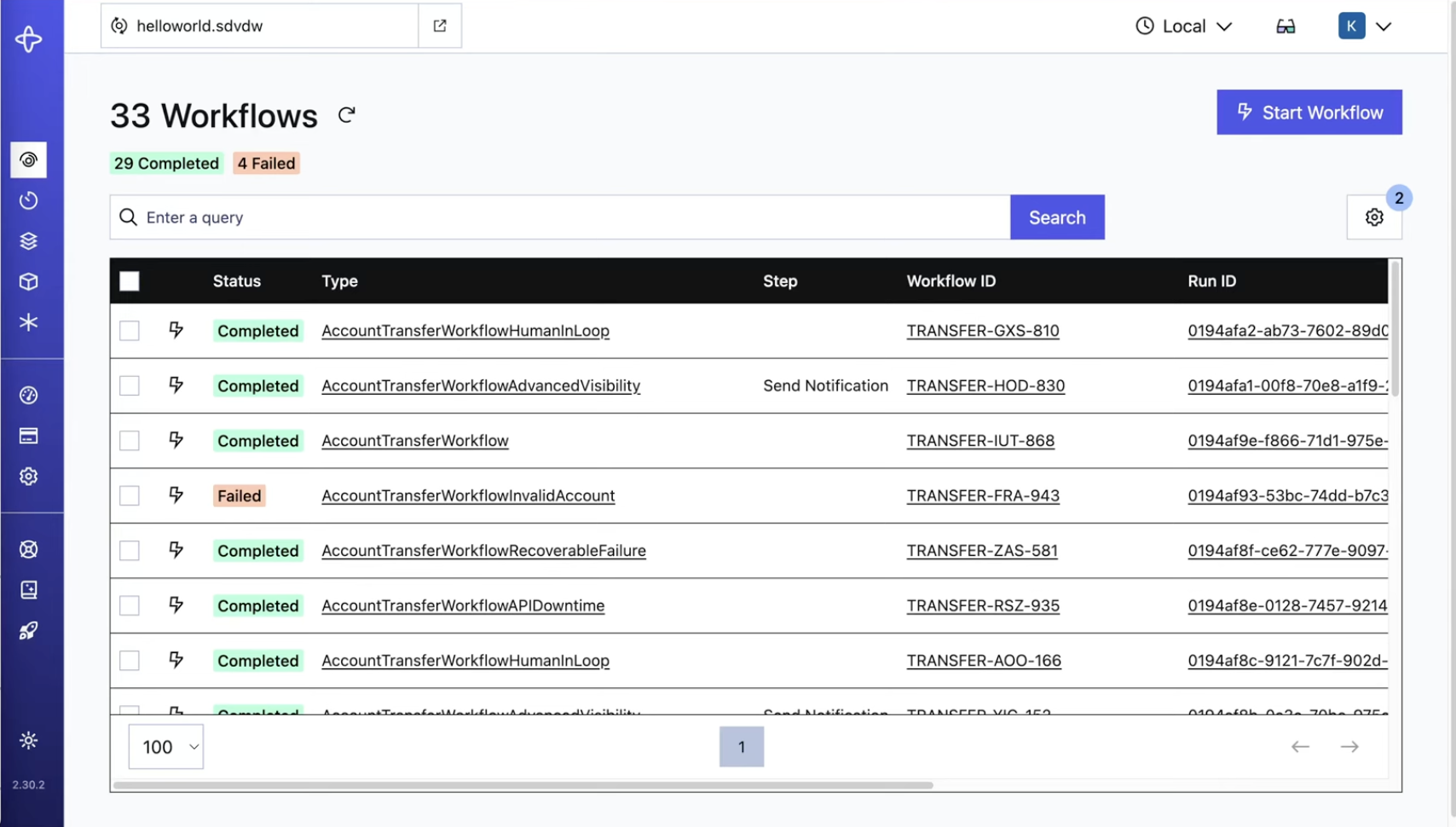
Click on the Workflow in the list to see the full event history. In Part 2, you'll use that history to debug a live failure.